Configure ad assets
To manage ad substitution, Stream Personalization builds the path to retrieve the ad manifests based on the ADS response (VAST/VMAP or SCTE-130-3).
Like the Ad Decision Server URL, access to ad assets manifest is achieved using URL template pattern. This is usually based on:
- Base location where ads are stored (could be a local origin, a CDN endpoint).
- Information retrieved from the VAST/VMAP or SCTE-130-3 response such as ad name, ad ID etc. available as a variable.
List of variables:
| VAST/VMAP | Stream Personalization variable | Description |
|---|---|---|
| Ad Title | {assetID} | If <adTitle> not preset, {assetID} is mapped to the adID value from <creative> VAST element. |
| MediaFile URL | {AssetURL} | URL for the creative. Regex can be used to extract the relevant portion (like creative name) and build the path towards the creative manifest. |
| SCTE-130-3 | Stream Personalization variable | Description |
|---|---|---|
<Core:URI> | {AssetURL} | URL of the creative. |
<Core:@assetID> | {assetID} | ID of the creative. Can be used to build the path to the creative manifest. |
| SCTE-224 | Stream Personalization variable | Description |
|---|---|---|
| Action:content | {assetID} | When Stream Personalization fetches all the details from the policy, viewing policy and audience, upon viewing policy match, the value of the action:content will be mapped to the variable {assetID=}. |
-
You have started configuring the ad decision server general parameters.
-
Go to the Asset tab.
-
Enter the appropriate value for each parameter:
Parameter Description Source URL pattern URL pattern to build the access to the ad manifest based on VAST/VMAP or SCTE-130 response from the ad server. Secondary source URL pattern Secondary source URL pattern to build the access to the ad manifest based on VAST/VMAP or SCTE-130 response from the ad server. Distribution URL pattern Segments/chunks distribution URL rewriting. When ad assets are fetched the same way a player would do, this setting is usually identical to Source URL pattern. In case ad asset manifests are fetched locally, this setting shall be properly configured. Creative miss notification Allows sending a notification to a Content Management System (e.g. CMS) in case of missing asset If you selected MediaKind, a new parameter is displayed to configure the asset management URL 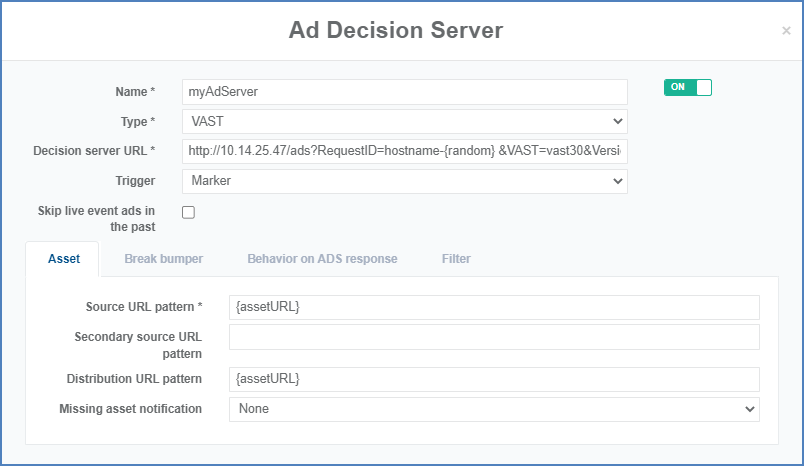 Ad asset configuration example
 -
Go to Configure break bumpers.